



MIPI Debug Over USB
.png?width=1200&height=600&name=Banner%20Images%20-%20MIPI%20(26).png)
General Info
The Debug Over USB (DO-USB) Specification describes methods for using the USB Debug Device Class (released in USB 3.1) as an interface to transport debug controls and data between a debug and test system (DTS) and a target system (TS). The use of USB to transport debug protocols minimizes debug’s impact on system functions and enables engineers to use the connection to debug a device while the connection is carrying other traffic.
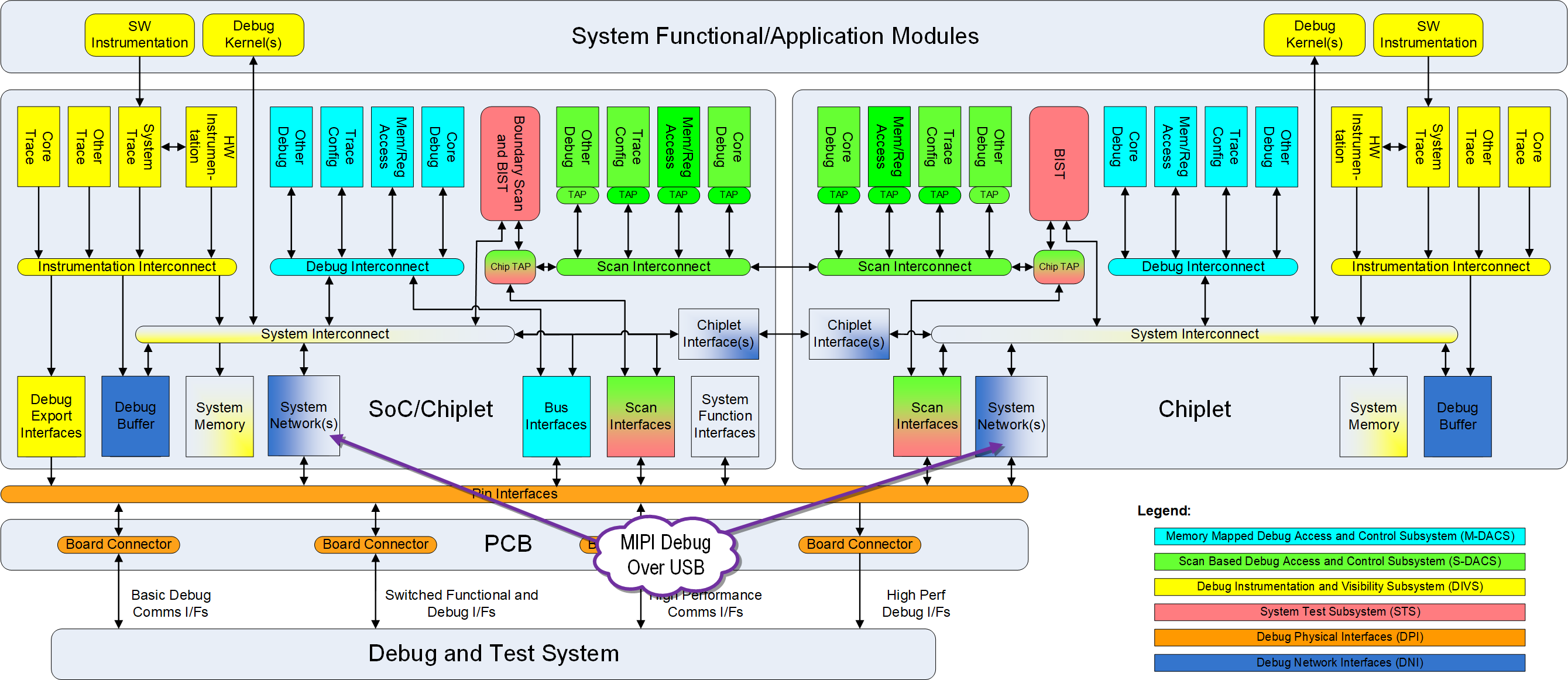
The diagram below shows the standard MIPI debug architecture highlighting the functional area addressed by the Debug Over USB specification.
MIPI Debug Over USB was developed by the MIPI Debug Working Group. The current version, v1.2 was adopted in August 2026. Previous public versions) are available upon request.
Key Highlights
Debug Over USB provides mechanisms to perform debug by using a USB network and describes the communication between a Debug and Test System (DTS) and a Target System (TS) over the USB connection. This communication is used for:
- Basic debug control, such as halt mode debugging of processors; and/or
- Tracing, where streams of data are emitted from a TS to be decoded and analyzed in a DTS.
In a MIPI Debug system, the DTS communicates through a USB Host Controller and the TS communicates through a USB Device Controller, which might be a USB OTG Controller operating as a Device Controller. Solutions can be designed to operate with USB controllers capable of operating in modes from USB 1.1 and higher to deliver a wide range of usable data rates. The choice of maximum data rate in a given implementation is a system-design issue influenced by the anticipated usage by clients, which might include the anticipated debug scenarios.
Debug Over USB defines the necessary USB Descriptors and requests based on the USB Debug Device Class.
Capabilities
MIPI Debug Over USB offers key capabilities that make the interface scalable and flexible for use in applications throughout a product's lifecycle:
- Defined for USB 1.1/Full Speed and higher data transfer rates
- Choice of data rate(s) supported is a system-design decision
- Support for co-existence of debug and functional traffic over the USB network
- Defines the USB Descriptors and Requests necessary for MIPI debug
- Based on the USB Debug Device Class
- Uses USB Bulk transport method